Tender Methods
Tender methods are payment types accepted at point of sale or for receipt of account payments
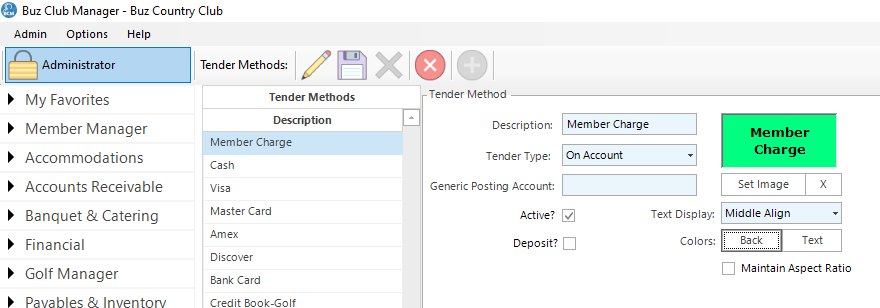
Select POS Settings/Tender Methods to launch the Tender Methods form.
Tool Bar
Tool Bar options include:
- Edit
- Save
- Delete
- Cancel
- Add
Add Tender Method
To add a Tender Method, click the New button. Complete the fields on the form as follows:
- Description. The description will appear on the tender button in the point of sale or in the list of payment types when receiving an account of cash book payment.
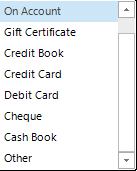
- Tender Type. Select from the available tender types in the drop down list.
- Generic Posting Account. Deprecated
- Active?: Check this value if this tender method is currently active.
- Deposit?: Check this value if the receipts for this tender type will be deposited to the bank account using the deposit module. Check, credit card, debit card and cash are typically are the tender methods that will be used with the Deposit module.
- Set Image: You may add a background image or change the color properties of the image to make it easier for your staff to differentiate between various tender methods.
Once the form is complete, click Save.
Modify Tender Method
To modify a tender method, select the tender method in the left hand panel, then select Edit. Make the desired changes, then select Save.
Delete Tender Method
To delete a tender method, select the tender method in the left hand panel, then select Delete. When the confirmation screen appears, make the desired selection.
Note: You cannot delete Tender Methods which are not in use in a profile.