Report Manager
The Report Manager enables the creation of membership reports based on queries which have been cretaed in the Query Manager
Contents
Interface
Launch the Report Manager from the Reporting group.
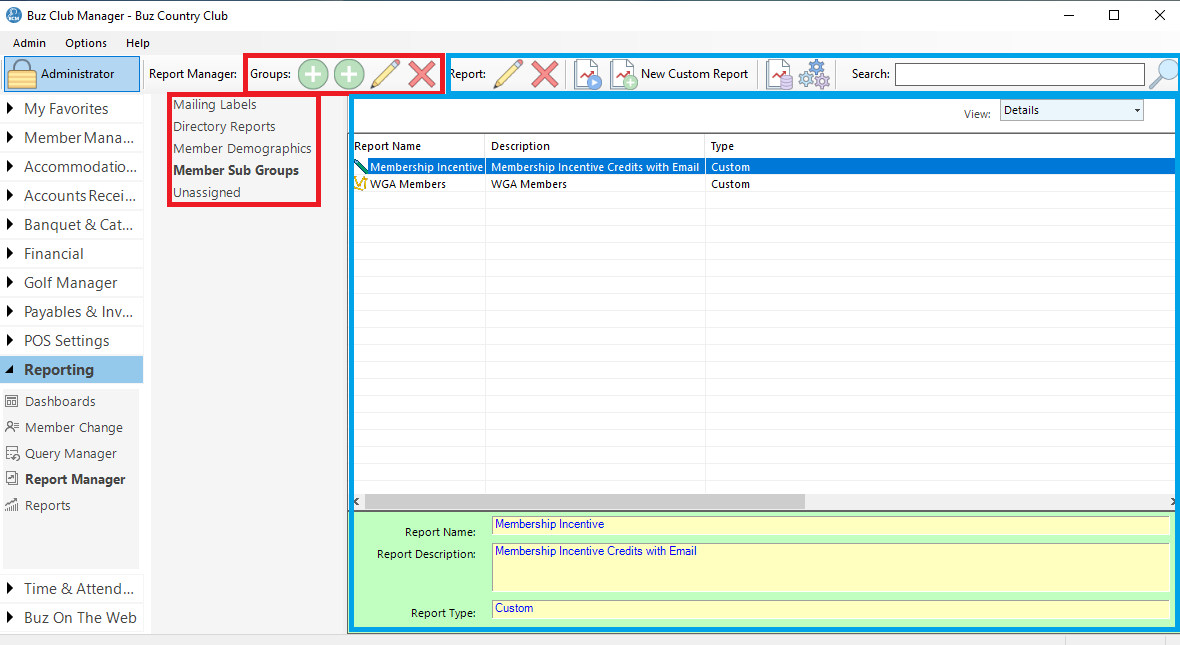
Tool Bar
The Tool Bar is divided into two sections
Groups (outlined in red)
- Add Group
- Add Child Group
- Edit
- Delete
Reports (outlined in blue)
- Edit Report
- Delete Report
- Run Report
- New Custom Report
- Incorporate SQL Report (Deprecated)
- Settings (Deprecated)
Report Groups (outlined in red)
Query groups are listed in the left hand panel in tree view.
Reports (outlined in blue)
When you select a report group, all of the reports associated with that group are listed in the Reports list tot he right.
Manage Report Groups
To simplify the organization of Queries, the Query Manager provides for the creation of groups and sub groups (categories and sub categories). Top level groups are called Groups and sub groups are called Child Groups.
Add a Report Group
To add a Query Group, click the Add Group button on the Tool Bar.
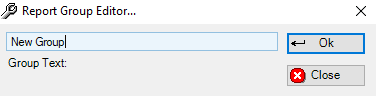
Enter the name of the group and click OK.
Add a Report Child Group
To add Child Groups, click on the Parent Group in the Group panel and select Add Child Group from the Tool Bar. Enter the name in the Report Group Editor and click OK.
Modify/Delete Groups
To edit or remove a group (both Parent and Child), click on the group in the Group Panel and click on the desired action on the Tool Bar.