Managing Suppliers
To access the Supplier Manager click on the Payables & Inventory Group and select Supplier Manager from the list.
.PNG)
Supplier List
The Supplier list provides an alphabetical/searchable listing of all suppliers. The supplier list can be searched by name or invoice number by typing in the applicable search form at the top of the supplier list. To clear the search, click on the  to the right of the search field.
Tabs
Once a supplier has been selected, there are four tabs across the top,of the screen:
- General provides all information pertaining to the supplier and provides for adding new suppliers and maintaining information about existing suppliers
- Purchase Orders provides a listing of all purchase orders associated with the supplier and supports the purchase order process from:
- Entering a PO
- Issuing a PO
- Receiving a PO
- Approving a PO
- Invoices provides a listing of all invoices associated with the supplier and supports the invoice processing process from:
- Entering an Invoice
- Approving an invoice
- Cheques provides a listing of all cheques issued to the supplier and supports
- Re-printing the cheque
- Re-printing the cheque stub
- Canceling the cheque
Add Supplier
To add a Supplier, select the + button on the Tool Bar (while on the General tab). The Supplier Editor will load:
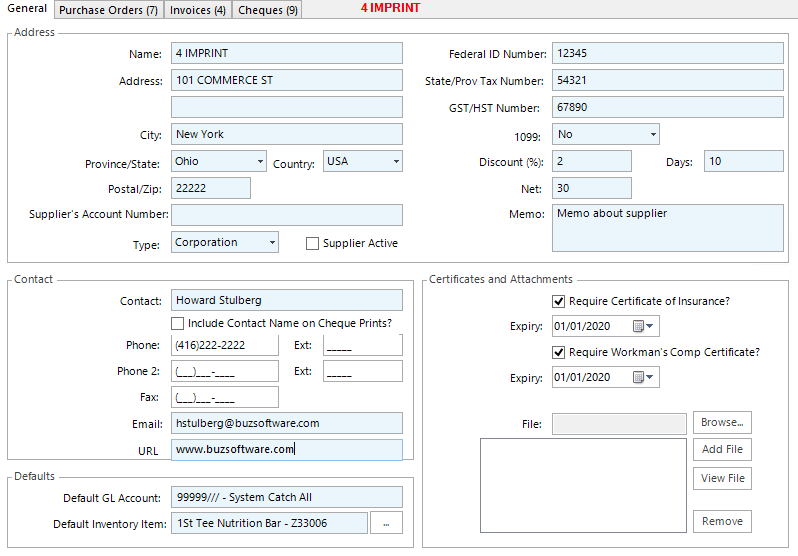
The form is broken down into 4 sections:
- Address
- Contact
- Defaults
- Certificates and Attachments
Address
In the address area complete the standard information on the left hand side. which is self-explanatory.
On the right hand side:
- Federal ID Number: An Employer Identification Number (EIN) is also known as a FederalTax Identification Number, and is used to identify a business entity. For unincorporated businesses this field would require a Social Insurance Number.
- State/Province Tax Number: Then suppliers state or province ales tax number
- GST/HST: GST or HST number for Canadian suppliers
- 1099: US only. Used for suppliers that are not non corporations and for which 1099 filings may be required
- Standard Payment Terms:
- Discount %: Any possible discount if an invoice is paid within a specific amount of days (set this variable in the Days field)
- Net: The number of days after the invoice date that payment is due by.
- Supplier Active: Check off this box if the supplier is active.
Note: The Supplier Active checkbox allows you to filter the supplier list based on the status of All, Active and Inactive
Contact
Complete the standard contact information fro the supplier
Defaults
- Default GL Account: Default GL Account for your Invoices for the specific supplier.
- Default Inventory Item: Default Inventory Item for Purchase Orders for the supplier.
Certificates and Attachments
If you are required to obtain Certificates of Insurance or Workman's Comp Certificates, check the applicable check boxes and set the expiry date. Alerts will pop up when clicking on the supplier, if the expiry date has passed.
This section also supports uploading documents pertaining to the supplier. To attach a document to a supplier profile, click on the Browse button, select the file on your local computer and then click the Add button. To view an attached file, click on the file in the list and then select the View File button.
Enter all of the supplier details, then click on the Save Supplier button in the Action Bar.
Modify Supplier Information
To modify supplier information, click on the supplier name in the Supplier List, then select the Edit button on the Tool Bar. Make the desired changes, then click Save Supplier.
Delete Supplier
To delete a supplier, click on the supplier name in the supplier list, then select the Delete button on the Tool Bar. When prompted, select Yes to delete the supplier.
Note: Rather than delete suppliers, it is advisable to mark them as Inactive by unchecking the Supplier Active check box