Profile Manager
The Profile Manager is a menu builder application for Point of Sale.
Contents
- Interface
- Profile Types
- Food and Beverage
- Retail
- Member Billing
- Retail Web Site
- Self Service POS
- Member Gate Checkin
- Accommodations
- Banquet & Catering
- Managing Profiles
Interface
To launch the Profile Manager, click on the application in the POS settings application group.
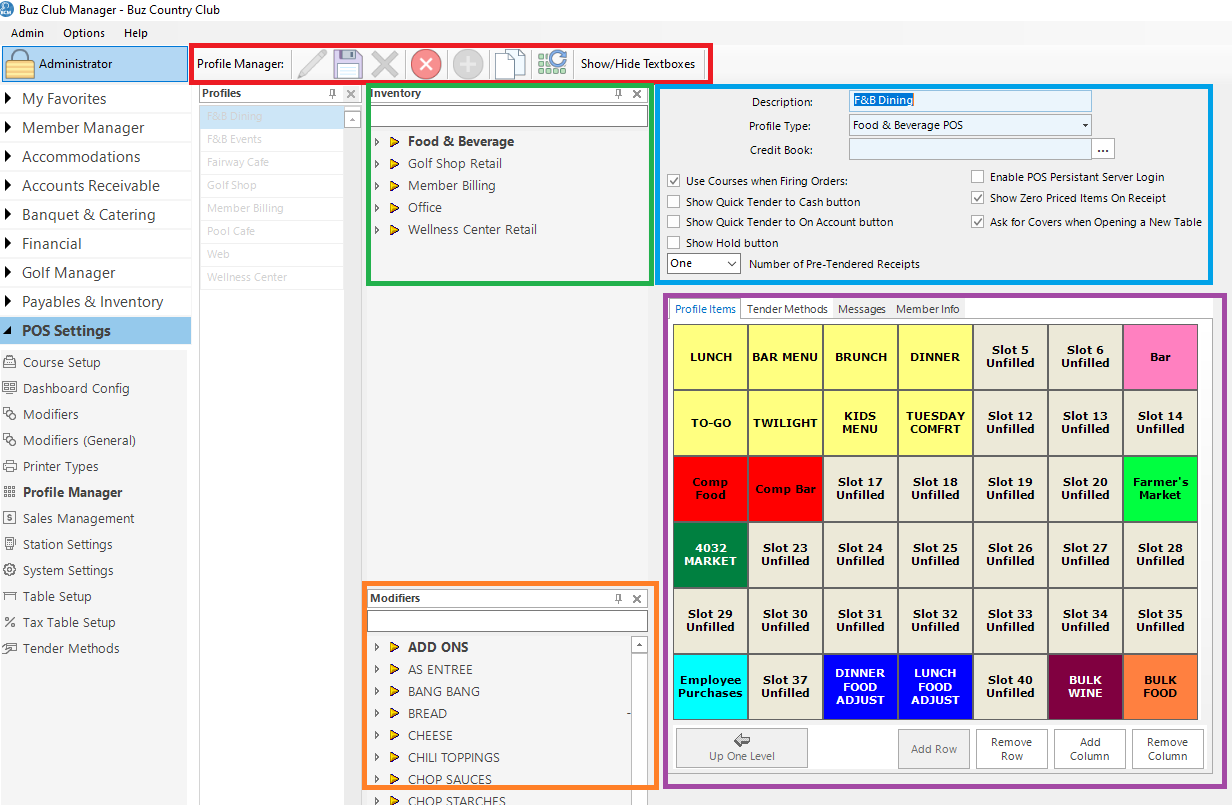
Tool Bar (outlined in red)
The Tool Bar has 8 menu options
- Edit
- Save
- Delete
- Cancel
- Add
- Clone
- Recover
- Show/Hide Textboxes
Settings (outlined in blue)
Each profile has a Description and Profile Type. Based on the profile type, there are settings to be configured.
Inventory (outlined in green)
Sales items and categories can be dragged onto the POS grid from the instance of the Inventory Manager.
Modifiers (outlined in orange)
F&B modifiers can be dragged onto inventory items and categories on the POS grid.
POS Grid (outlined in purple)
The POS grid has 4 tabs:
- Profile Items which are the sales items and categories which appear on the POS menu
- Tender Methods which are the payment methods which will be accepted for the menu
- Messages will be printed at the bottom of the receipt
- Member Info which is information about the selected member which will be displayed to servers.
Profile Types
There are 8 profile types. A brief description and special settings are described below.
Food and Beverage
A food and beverage profile is used for restaurant and bar outlets and has been designed specifically for those type of operations.
When creating a food and beverage profile, there are configuration options which are described below.

- Description: This is the name of the menu
- Profile Type: Select Food & Beverage from the drop down menu
- Credit Book: If your club has a F&B credit book, select the credit book from the drop down list
- Optional Checkboxes
- Use Courses when Firing Orders: If orders are to be sent to the kitchen prep printers by course and if the servers will be firing courses for pick up to the kitchen, check off this box. For this feature to work, coursing has to be set up and applied to the relevant inventory categories.
- Show Quick Tender to Cash button: This feature adds a Quick Tender Cash button on the main POS order screen will be beneficial for a cash bar, where a ticket is opened, the order placed and the ticket tendered to cash.
- Show Quick Tender to On Account button: This feature adds a Quick Tender Account button on the main POS order screen. It is convenient for a bar or snack shack where a ticket is opened, the order placed and the ticket tendered. When suing this feature, there is no opportunity to add a gratuity to the ticket.
- Show Hold button: If you want the empower servers to hold items, so that they are not sent to the prep printers, check off this item.
- Enable POS Persistent Server Login: This feature should be used in a single server environment only.
- Show Zero Priced Items on Receipt: Self explanatory
- Ask for Covers when Opening a New Table: This feature will open a table with the number of seats entered.
- Number of Pre-Tendered Receipts: Select the number of receipts to print when a server is taking receipts to the table, prior to closing the ticket.
Retail
A retail profile is used for retail operations such as a golf shop, tennis shop or ship store.
When creating a retail profile, there are configuration options which are described below.
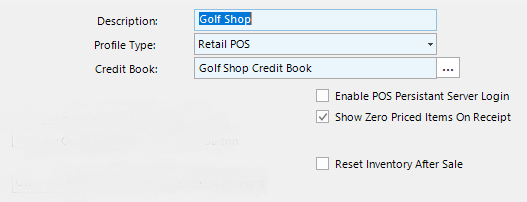
- Description: This is the name of the menu
- Profile Type: Select Food & Beverage from the drop down menu
- Credit Book: If your club has a F&B credit book, select the credit book from the drop down list
- Optional Checkboxes
- Enable POS Persistent Server Login: This feature should be used in a single server environment only.
- Show Zero Priced Items on Receipt: Self explanatory
- Reset Inventory After Sale: Returns to the to level screen after an item is selected, rather than remaining on the screen of the selected item.
Member Billing
The member billing profile is used for member charges such as dues and fees. The only configuration option is:
- Enable POS Persistent Server Login: This feature should be used in a single server environment only.
Retail Web Site
The retail website profile is required if 1) members are paying there accounts online via the website, 2) members are registering and paying for programs using the Program Registration System or 3) members are purchasing merchandise or services from the club's web store.
There are no configuration options.
Self Service POS
No longer supported
Member Gate Checkin
The member gate checkin profile is required if the club is using the Member Check In application, which can be used for checking members in at a gatehouse, fitness center or swimming pool. The Member Checkin application can register guests and process charges.
There are no configuration options.
Accommodations
The accommodations profile is used in conjunction with he Buz Accommodations application.
There are no configuration options.
Banquet & Catering
The banquet & catering profile is used in conjunction with he Buz Banquet & Catering application.
There are no configuration options.