Golf Category Manager
The Golf Category Manager is used to create golf categories and set booking privileges and restrictions.
Contents
Interface
Launch the Golf Category Manager from the Golf Manager group.
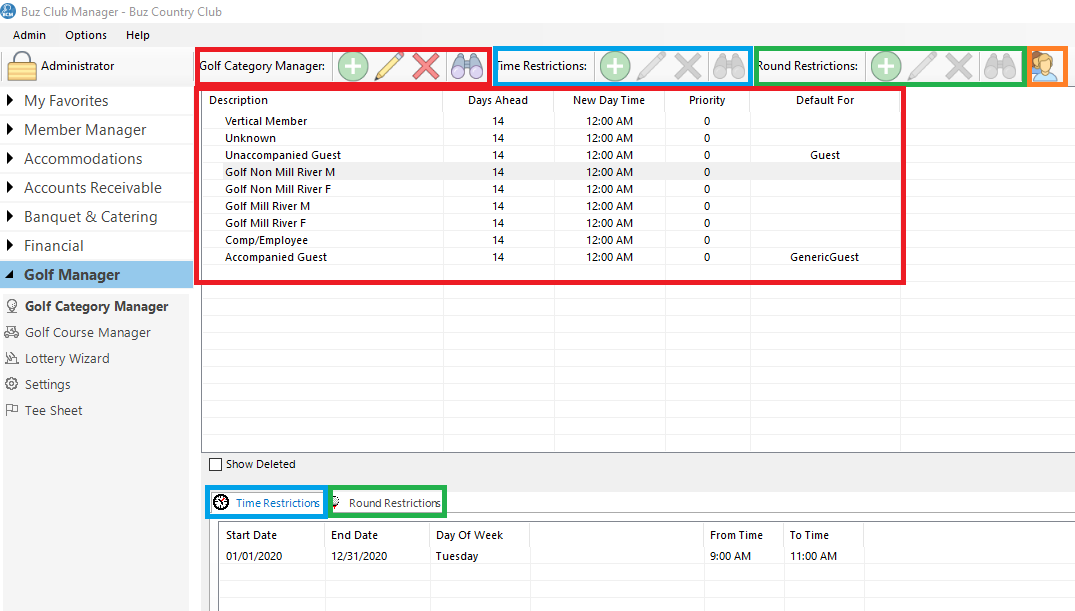
Tool Bar
The tool bar is divided in to 4 sections:
- Golf Category Manager (outlined in red)
- Add
- Edit
- Delete
- View
- Time Restrictions (outlined in blue)
- Add
- Edit
- Delete
- View
- Rounds Restrictions
- Add
- Edit
- Delete
- View
- View Member List (outlined in orange)
Golf Category Listing (top panel outlined in red)
The listing provides a list of all golf categories and includes:
- Description
- Days Ahead (that a member in the category can book a tee time)
- New Day Time (the time of day the booking window opens)
- Priority (this is used for the priority algorithm when assigning tee times by lottery)
- Default For
The lower panel of the Golf Category Manager has two tabs, one for Time Restrictions and one for Rounds Restrictions
Time Restrictions
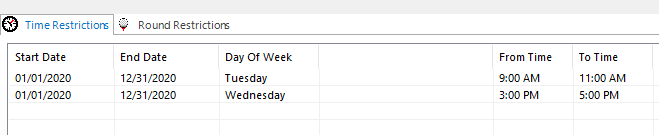
Rounds Restrictions

Manage Golf Categories
Golf categories are used to establish the tee time privileges of members in terms of how far in advance they can book, how often they can play and what days of the week and times of day they do not have access to the tee.
Add and Modify Golf Categories
To add a golf category, click on the + button on the tool bar in the section for Golf Category Manager or right click anywhere in the listing area to launch a context sensitive menu.
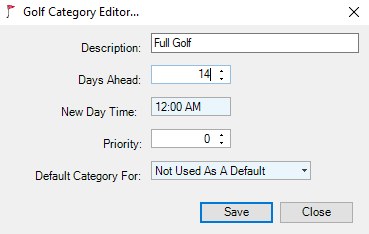
Default Category For options include:
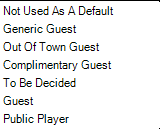
Complete the form and then click Save.
To modify a Golf Category, select the category in the Golf Category listing and right click for the context sensitive menu or select the applicable button on the tool bar.
Tee Time Restrictions
It is common for clubs to have days of the week and times of the day where certain golf categories do not have access to the tee.
To create a Tee Time Restriction:
Step 1: Select the category in the Golf Category listing
Step 2: Select the Times Restriction tab in the lower panel
Step 3: Select the applicable button on the tool bar (optionally right click in the lower panel for a context sensitive menu)
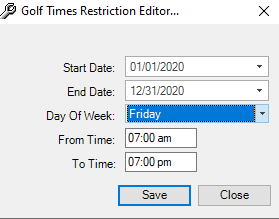
Step 4: Complete the form and click Save.
To modify a Time Restriction, select the restriction to be modified, select the applicable button on the tool bar (optionally right click in the lower panel for a context sensitive menu).
Modify the form and click Save.
Rounds Restrictions
It is common for clubs to have rounds restrictions for certain golf categories.
To create a Rounds Restriction:
Step 1: Select the category in the Golf Category listing,
Step 2: Select the Rounds Restriction tab in the lower panel
Step 3: Select the applicable button on the tool bar (optionally right click in the lower panel for a context sensitive menu).
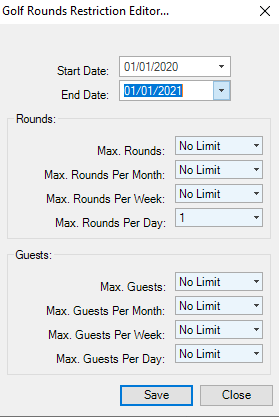
Step 4: Complete the form and click Save.
To modify a Rounds Restriction, select the restriction to be modified, select the applicable button on the tool bar (optionally right click in the lower panel for a context sensitive menu).
Modify the form and click Save.