B&C Getting Started
Payments and Deposits
B&C facilitated taking deposits and payments from within the Event Manager. Follow the steps below to configure the system for taking payments and deposits.
- Deposits are typically posted to a liability account in the general ledger. Determine if there is a liability account and if not create it
- In the Inventory Manager create an inventory group called Deposits and Payments, in the banquet area where the sales account is the liability account above. Ensure that the retail tax fields are set to N/A
- Add an inventory item in the new Deposits and Payments group called 'Deposits and Payments' with a selling price of $0
- Navigate in the software to the Banquet & Catering group and select the Event Manager. On the toolbar select the setup icon
 .
.
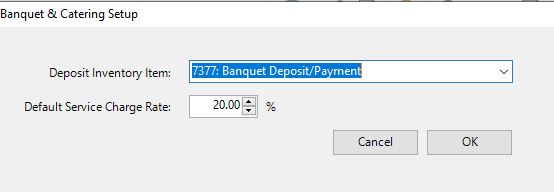
- Select the inventory item that was created ib=n the setup above ans then set the default service charge rate for events and then click OK
Banquest & Catering setup is now complete.
Creating Sales Items
All items sold and charged in Banquet & Catering must be set up in the Inventory Manager. Refer to the documentation on the Inventory Manager for comprehensive instructions.
Creating Modifiers
B&C supports the use of modifiers for sales items in the BEO. Refer to the documentation on Modifiers for comprehensive instructions.
Banquet Profile
B&C requires a profile to be set up of type Banquet & Catering. The profile should have all of the sales items which will be available to sell for a banquet. There is no need to design the menu screen Simply drag the highest level banquet inventory groups onto the profile. Remember to complete the Tender Methods tab. Refer to the documentation on the Profile Manager for comprehensive instructions.