|
webCommunicator
Reference Guide
 |
|
Previous Page | Next Page
 |
|
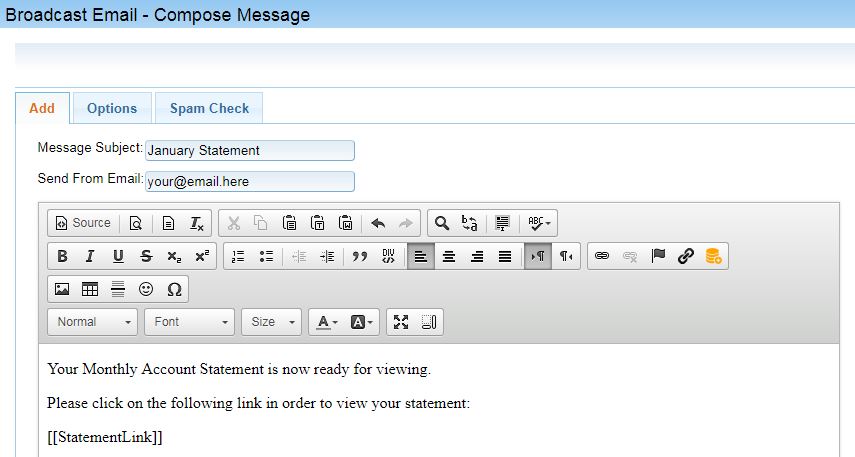
FAQsHow do I send the monthly statement email? 1. Create an email with the [[StatementLink]] variable in the content of the email:
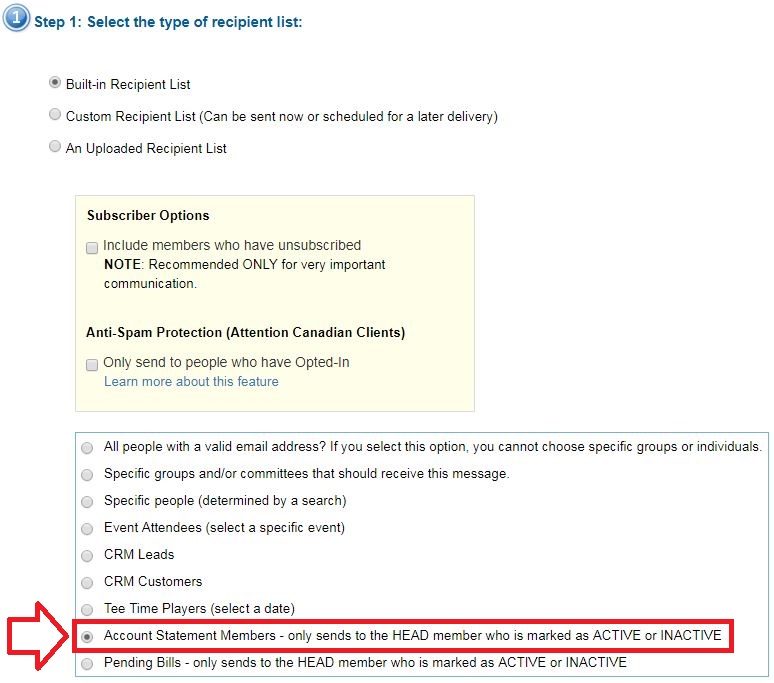
2. Save the email by clicking on the save icon: 3. Click on the send icon to start the process of sending the email: 4. In step 1 you must select Account Statement Members from the following options:
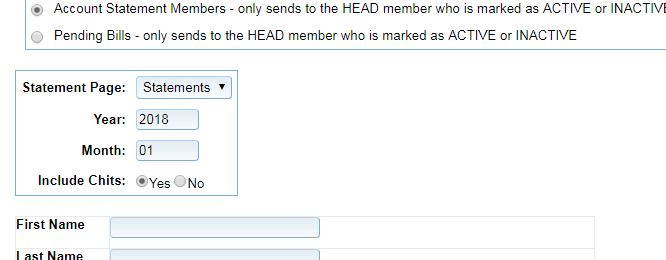
If this option is not selected your [[StatementLink]] variable will not contain a link to member statement. 5. Once the Account Statement Members option has been selected you will see more options below:
Here you may pick your statement page, year and month for the statement, and whether or not you'd like to send out chit information. Once you've completed your selections you may scroll down and click on Generate Email List. 6. In Step 2 you have the option to manually remove names from the list provided to you. Don't forget to click on Refine List in order to remove unchecked names from the list. Click on Confirm List and Verify Email to continue. 7. In Step 3 you may review your email and send it. Click on Send Email Now to send. |
|
|
|
|