

Setting Up The Tee-Sheet
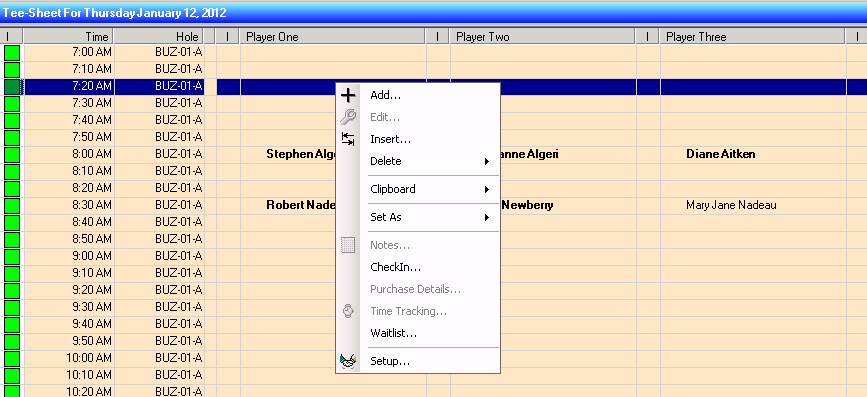
Anywhere in the tee-sheet window, right click and choose setup:
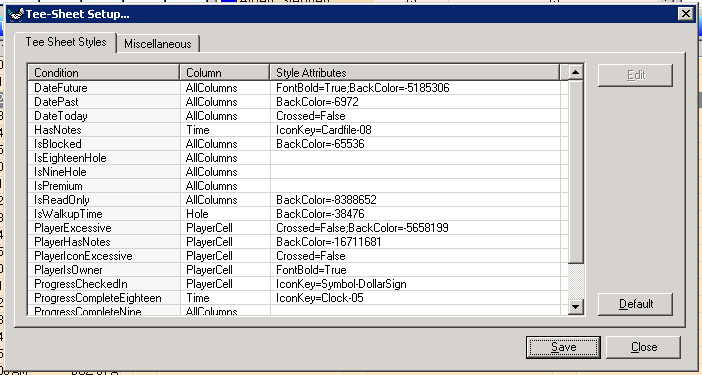
The Tee-Sheet Setup window will open:
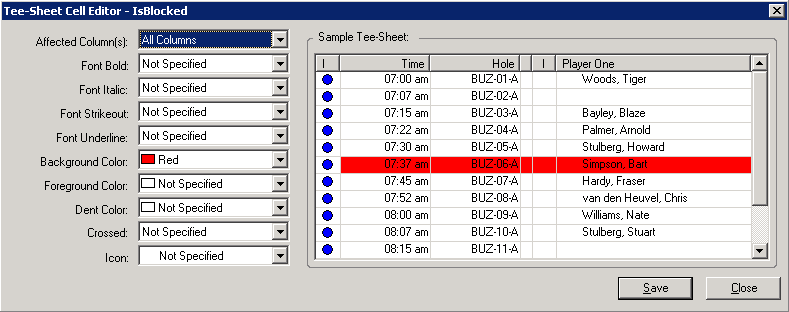
You can change any of the attributes of the cells by selecting a condition and clicking edit. The following window will open. In this example we have changed the background colour of the IsBlocked condition to be red:
Tee-Sheet Style Definitions
DateFuture Set the cell attributes on future Tee-sheets
DatePast Set the cell attributes on past Tee-sheets
DateToday Set the cell attributes to display on today's Tee-sheets
HasNotes Set the cell attributes to display when the tee time has notes
IsBlocked Set the cell attributes to display when the tee time is blocked
IsEighteenHole Set the cell attributes to display when the tee time is eighteen hole
IsLinkedBallot Set the cell attributes to display when the tee time is a linked ballot
IsNineHole Set the cell attributes to display when the tee time is nine hole
IsPremium Set the cell attributes to display when the tee time attracts a premium guest fee
IsReadOnly Set the cell attributes to display when the tee time is read only
IsWalkupTeeTime Set the cell attributes to display when the tee time is walk up
PlayerExcessive Set the cell attributes to display when there are too many players for the tee time
PlayerHasNotes Set the cell attributes to display when a tee time has notes for a player(s)
PlayerIconExcessive Set the cell attributes to display when
PlayerIsComplimentaryGuest Set the cell attributes to display when the player is a complimentary guest
PlayerIsGenericGuest Set the cell attributes to display when the player is a generic guest
PlayerIsGreenFee Set the cell attributes to display when a player is a public player
PlayerIsGuest Set the cell attributes to display when the player is a guest
PlayerIsMember Set the cell attributes to display when the player is a member
PlayerIsOutOfTownGuest Set the cell attributes to display when the player is an out of town guest
PlayerIsOwner Set the cell attributes to display when the player is the head of the group
PlayerIsReciprocal Set the cell attributes to display when the player is a member from a reciprocal club
PlayerIsToBeAnnounced Set the cell attributes to display when the player is unidentified
PlayerIsUnattendedGuest Set the cell attributes to display when the member is unattended with the guest
PlayerIsVisitor Set the cell attributes to display when the player is a visitor
ProgressCheckedIn Set the cell attributes to display when the player is checked in
ProgressCompleteEighteen Set the cell attributes to display when the player is finished eighteen holes
ProgressCompleteNine Set the cell attributes to display when the player has finished nine holes
ProgressTeedOff Set the cell attributes to display when the player has teed off
ProgressTeedOffTen Set the cell attributes to display when the player has teed off ten